Powerful extensions do not need powerful code
 ·
·
When Chrome introduced Manifest V3, ad blockers took the biggest hit. The idea behind MV3 itself was not necessarily a bad one: extension code that sits in the request path of every page load is bad for security and bad for performance, so it had to go. The replacement however was a capped and much less expressive rule format, and the most popular type of extension suddenly got a lot worse. Since then, the general feeling seems to be that you can have security, or you can have proper ad blocking, but not both.
We don’t believe that is true. For Gosub, we are designing our extension system around a simple idea: powerful extensions do not need powerful extension code. If the browser itself provides good enough building blocks, an extension can do a lot of things while its own code is allowed to do almost nothing. The install dialog is what nudges extension authors in that direction.
Capabilities, not permissions
In Chrome, the manifest basically is the grant: you list permission names, and those names map more or less directly
onto API surface. In Gosub, we treat the manifest as just input. During installation we translate it into an explicit
list of capabilities with scopes, things like filtering.block(all sites), content_script(youtube.com) or
network.egress_public(api.example.com). That list is what the enforcement layer, the dialogs and revocation all work
with, not the manifest itself. This gives us a few things Chrome cannot do:
- A host permission on its own means nothing. It only means something in combination with the API that uses it:
host_permissionsplusscriptingbecomescontent_script(hosts), the same hosts pluscookiesbecomescookies.read/write(hosts), and so on. There is no general “access to example.com”. - Nothing ever translates into a wildcard. The grant is always a concrete list, so a capability we add next year can never silently end up in the grant of an extension that was installed today.
- An extension can narrow its grant, but never widen it. With an optional
gosubkey in the manifest, an author can say “of everything my Chrome permissions imply, I only need these”. If that key contains a name the translation did not derive, it is rejected, not granted. And unknown or garbage permission strings (the ecosystem is full of them) are simply ignored.
When permissions combine
Chrome’s install prompt lists permissions one by one, and each line on its own sounds harmless enough. The problem is that permissions combine. An extension that can read pages and can talk to the network, can read your pages and send them somewhere. Neither line tells you this.
So during translation we don’t stop at the individual capabilities. We also calculate what the combinations add up to, and the dialog leads with that instead of with the ingredient list. Let’s look at a real one. This is the manifest of Grammarly, straight from the Chrome Web Store, run through our translator:
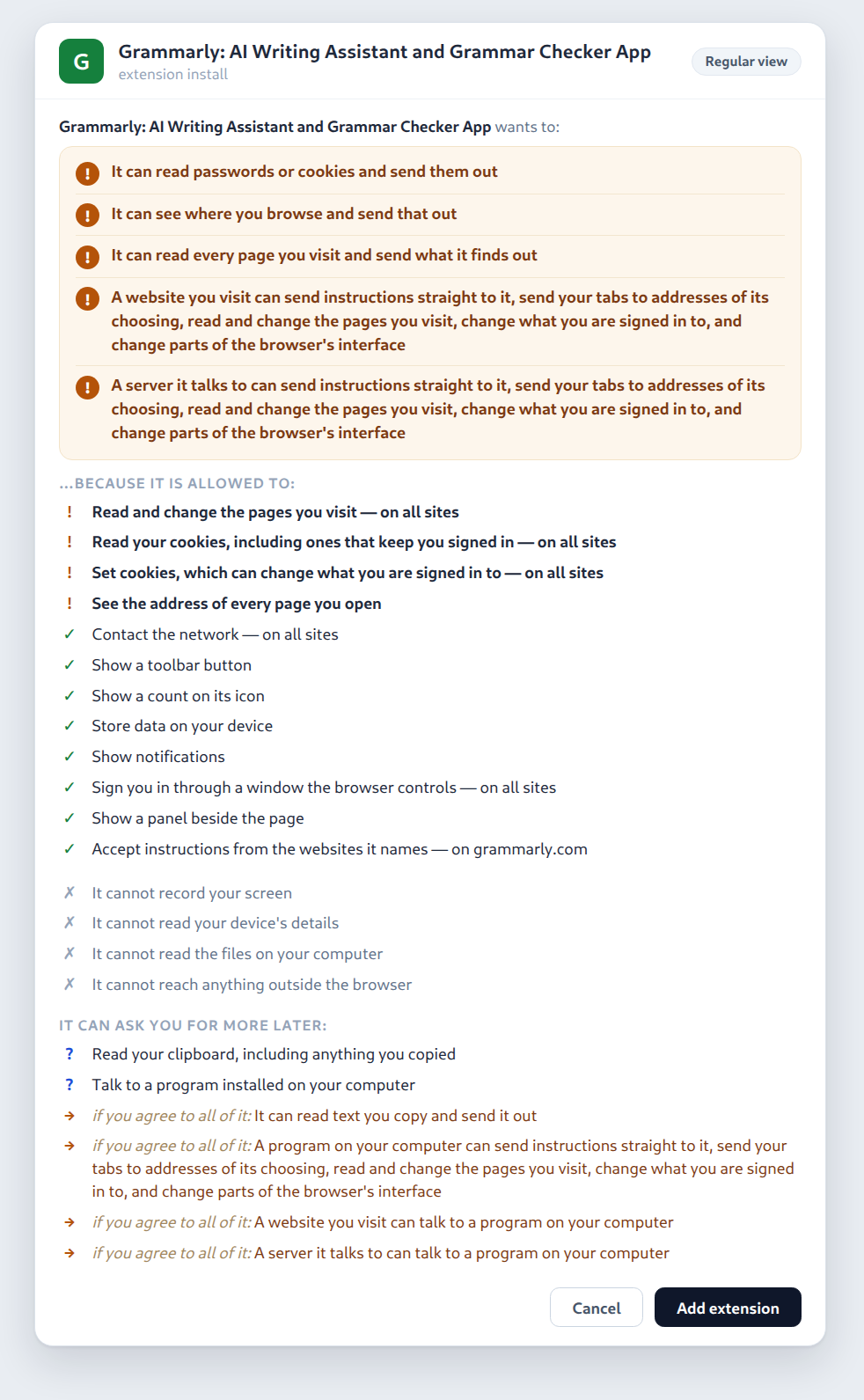
(All dialog images in this post are styled renderings of the actual output of our translator. None of the text inside them was written by hand.)
To be clear: this does not mean that Grammarly is doing any of these things. It is a perfectly legitimate tool, and to check your writing it simply needs to read what you type, on every site. But that is exactly the point: the current permission model cannot tell the difference between a grammar checker and a keylogger, since both need to read what you type. So the dialog shows what the granted authority makes possible, instead of guessing what the extension intends to do with it. We only inform the user, we never forbid anything; it is still the user who decides.
Further down, the dialog lists what the extension cannot do. We can prove those claims from the grant, and they give the user some contrast to judge the warnings against. And at the very bottom you can see the optional permissions: things Grammarly may ask for later, together with what agreeing to them would unlock.
Loudness as an incentive
Every capability has a tier: silent, standard, loud or gated. Loud grants, and anything that produces a derived warning,
get the ! treatment you saw above. So yes, an extension can still do everything with its own privileged code. But if
it does, the dialog will spell out exactly what that code is able to do. Do you want a content script on every site? You
can have one, but your users will be told in plain words what that means.
The other half of the story is that the browser offers safer building blocks for the things extensions usually do: filtering, cosmetic hiding, a vetted scriptlet library, mediated form filling, declarative DOM actions. If you use such a primitive instead of your own code, your dialog becomes quieter. So the dialog really has two audiences: it tells the user what an extension can do, and it gives the author immediate feedback on how much authority they are asking for. That is basically the whole incentive: a quiet install dialog is the reward for staying on the safe path.
But what about ad blockers?
We keep the core decision of MV3: no extension code in the request path. What we don’t keep is the idea that this has to result in a small, capped rule format.
Instead, Gosub ships a native filter engine (we called it baleen, after the way a whale filters krill) that understands
the ABP/uBO list syntax the filter community has been maintaining for years. Blocking rules, exceptions, $important,
cosmetic hiding, the common procedural selectors, scriptlets from an audited library, rules the user adds themselves:
all of this runs inside the browser, not inside extension code. And it turns out this is fast enough that we don’t need
any caps: a stack of 27 lists with 719,000 rules matches in about 7 µs per request, and EasyList + EasyPrivacy in about
1.6 µs. That is roughly twice as fast as Brave’s engine on the same request corpus.
So on Gosub, an ad blocker ships lists, not code. And when it narrows its manifest with the gosub key, it ends up with
filtering capabilities that are all silent or standard tier. Here is what a uBO-Lite-style blocker looks like at install
time. The dialog comes in two flavors: on the left the regular view that most users will see, plain sentences and
nothing else. On the right the power-user view, which adds the capability names and scopes for people who want to verify
the claims instead of just believing them. The ↳ lines under each warning show how it was derived: which two
capabilities combined into it. Most people should never have to see a string like page.exfiltration, but it is there
for those who do:
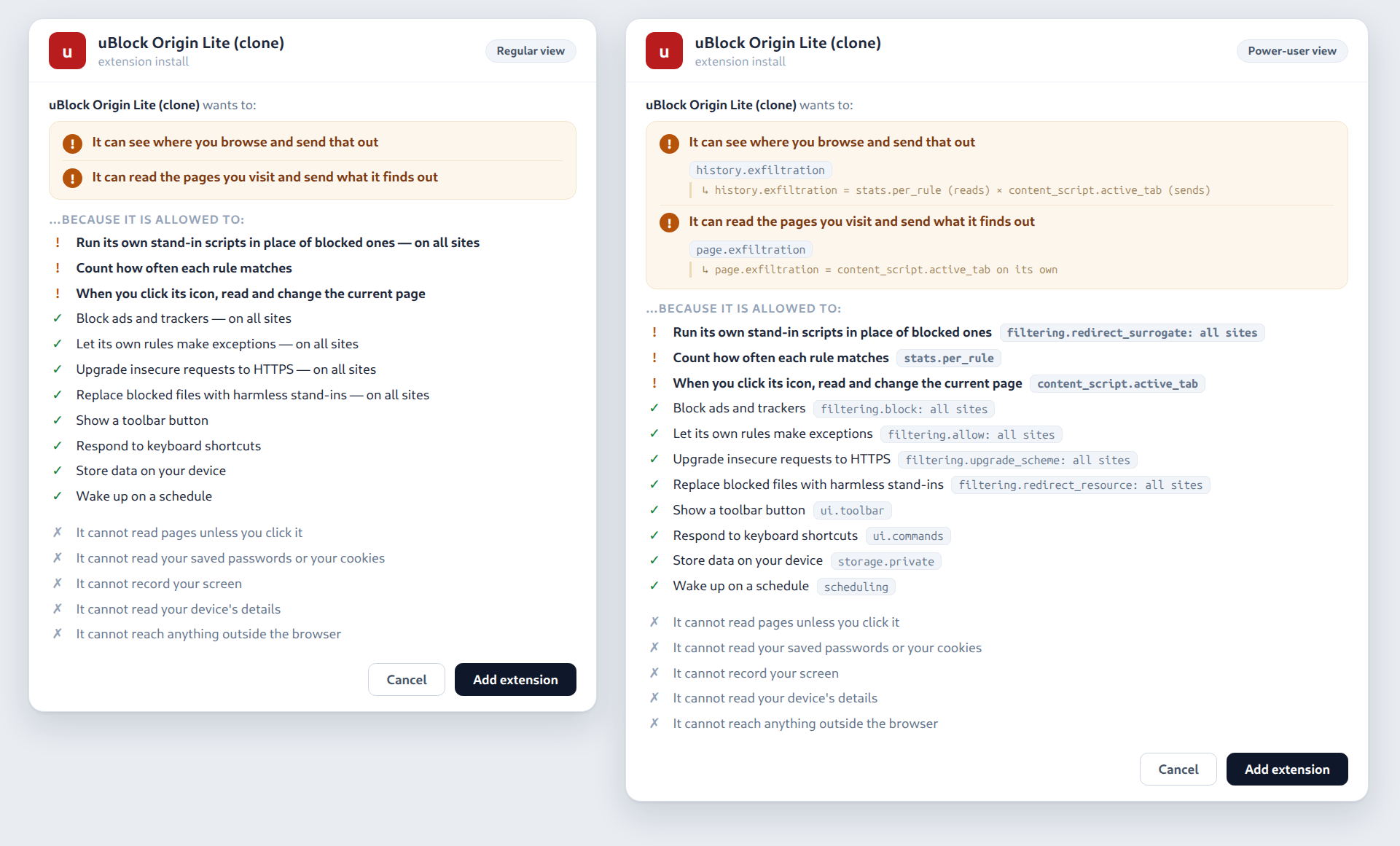
Both views come from the same grant. The only warnings left come from the click-to-zap gesture and from the per-rule match counters, and the dialog says exactly that. It even promises that the extension cannot read pages unless you click it.
To see why this matters, let’s run the raw Chrome manifest of the same extension through the same translator. Chrome’s permission language can only say “scripting, on all sites”, so this is what that honestly amounts to (power-user view again):
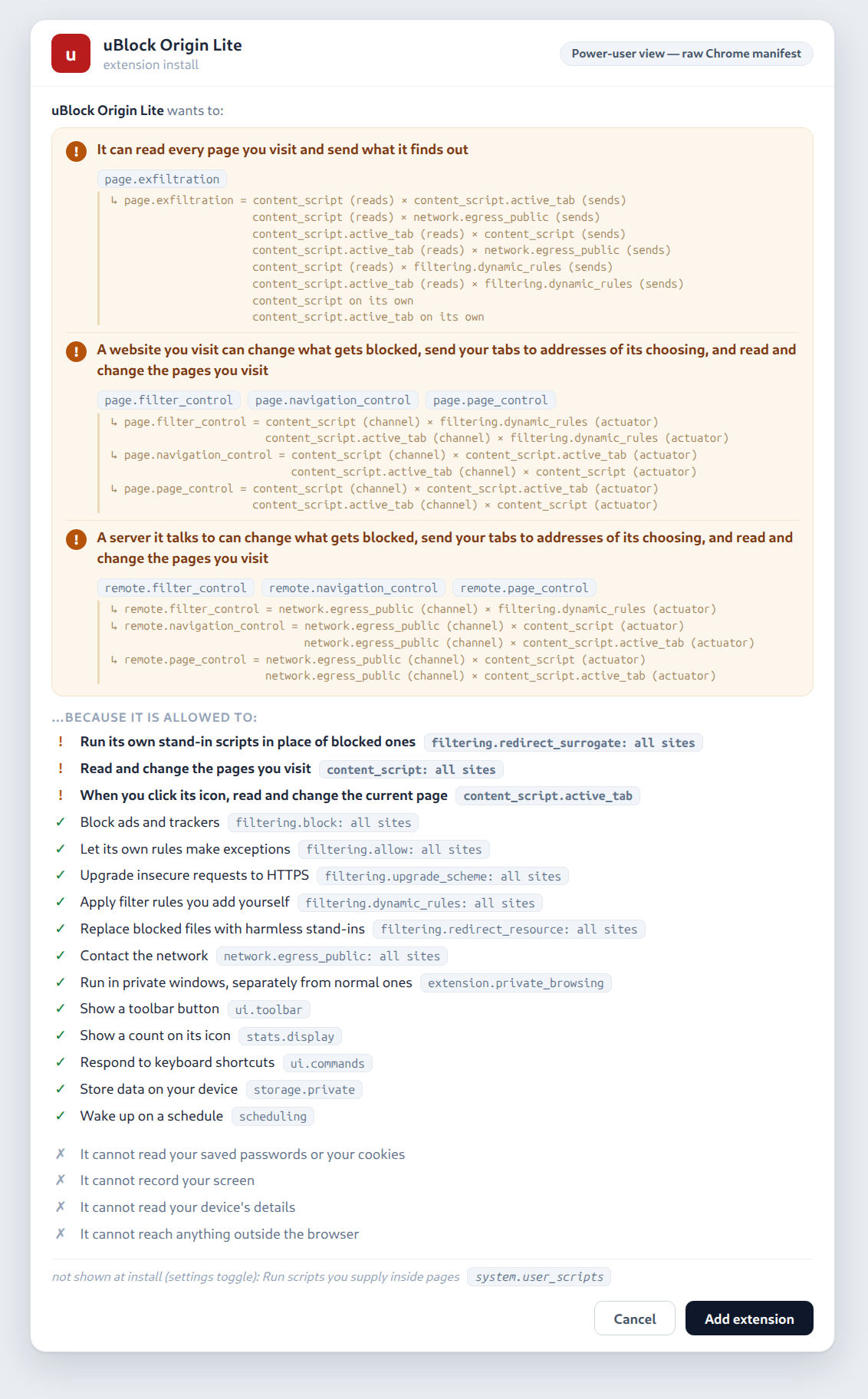
Same extension, same behaviour. The only difference is a grant that is able to express “I only filter”. And that distinction matters: an extension can have a powerful effect without holding an equally powerful general-purpose primitive.
By the way, filter lists get the same treatment as the manifest. A list is exactly the place where you could hide a
$redirect rule that runs code inside pages, behind a manifest that looks completely innocent. So anything a bundled
list adds to the extension’s authority shows up in the dialog as well, in its own section. Moving authority from the
manifest into a rule file should not make it disappear from the security model.
You might wonder how much of the real-world lists we can actually handle natively. We measured it against uBO’s own filter list: 55% of the cosmetic-family rules are scriptlets, 33% are plain cosmetic rules and 11% are procedural. All of these are supported natively. Only 0.8% of the rules would still need the loud content-script route.
Where we are now
All of this exists today as a design prototype: a versioned spec (the capability registry, the composition rules, the dialog rules) and a Rust harness that translates real manifests from start to finish: manifest in, enforced grant out. We run it against 10,165 real manifests from the Chrome Web Store, and 47% of them currently produce at least one combined warning. That probably says more about the permission model these extensions grew up with than about their intentions.
What does not exist yet is the browser side. We are nowhere near implementing all of this in Gosub, and we don’t even know whether the final extension system will look exactly like this. The design still needs a lot of work, and implementing it will undoubtedly expose assumptions that look good on paper but don’t survive contact with a real browser. The dialogs need work as well: we don’t want to scare users with a wall of warning signs until they learn to ignore all of them, but we also don’t want extensions to receive authority the user could not reasonably have expected. Finding that balance is part of the experiment.
If MV3 showed us anything, it is that browsers ask users to approve API names, while extensions deal in effects. By translating manifests into capabilities, spelling out what the combinations mean, and making the dangerous route loud, we think we can keep MV3’s architectural advantage without giving up powerful extensions like ad blockers. And every other kind of extension gets a quiet path to aim for.